

Businesses today are under constant pressure to improve efficiency while managing growing workloads. This is where AI automation is making a significant impact.
By combining artificial intelligence with workflow automation, businesses can streamline repetitive tasks and improve decision-making across multiple departments.
In this guide, you’ll learn what AI automation is, along with practical use cases across finance, HR, sales, marketing, and operations. You’ll also find how to implement AI automation successfully within your organization.
What Is AI Automation?
AI automation is the use of artificial intelligence (AI) to automate tasks and workflows that normally require human effort. Unlike traditional automation, which follows fixed rules, AI automation can analyze data, recognize patterns, understand context, and make decisions based on the information it receives.
For example, a traditional workflow can automatically send an invoice after a purchase. An AI-powered workflow can pull invoice data, check for errors, send it for approval, and identify unusual transactions without manual intervention.
In simple terms, AI automation helps you automate both repetitive tasks and parts of the decision-making process.
Key technologies behind AI automation
AI automation is built on several technologies:
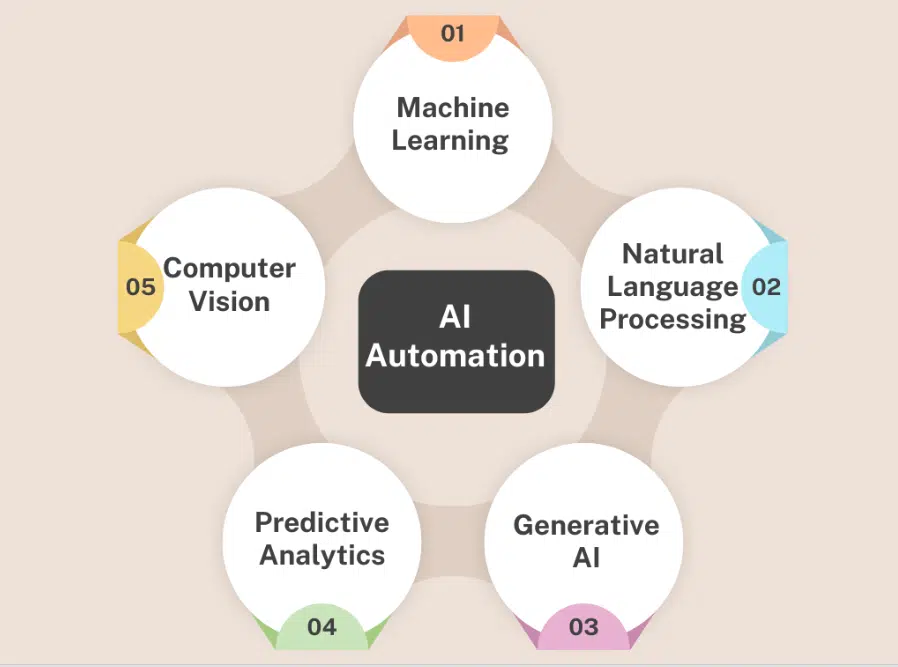
- Machine Learning (ML): Learns from data to make predictions and improve outcomes over time.
- Natural Language Processing (NLP): Helps AI understand and respond to human language.
- Generative AI: Creates content such as emails, reports, summaries, and marketing copy.
- Predictive Analytics: Uses historical data to forecast future outcomes and trends.
- Computer Vision: Extracts and processes information from images, videos, and documents.
Together, these technologies help businesses automate workflows, improve accuracy, and scale operations more efficiently.
AI Automation Use Cases in Finance
Finance teams handle large volumes of data, transactions, approvals, and reports every day. Many of these processes are repetitive, time-consuming, and likely to result in errors.
AI automation helps you streamline these workflows by reducing manual work and speeding up financial operations. As a result, your team can spend less time on administrative tasks and more time on strategic financial planning.
Here are some of the most common AI automation use cases in finance.
1. Invoice processing and accounts payable automation
Processing invoices manually can slow down payments and increase the risk of errors.
AI-powered systems can:
- Extract information from invoices automatically
- Match invoices with purchase orders
- Send approvals to the right stakeholders
- Identify missing or incorrect information
This helps you process invoices faster while maintaining accuracy and compliance.
2. Expense management automation
Reviewing employee expenses manually can become difficult as your business grows.
AI can automate tasks such as:
- Receipt scanning and data collection
- Expense categorization
- Policy compliance checks
- Payback approvals
This reduces administrative work and speeds up the payback process.
3. Financial forecasting and budget planning
Accurate forecasting is essential for making informed business decisions.
AI can analyze historical financial data to:
- Predict future revenue
- Forecast cash flow
- Identify spending trends
- Support budget planning
This helps finance teams make more confident and data-driven decisions.
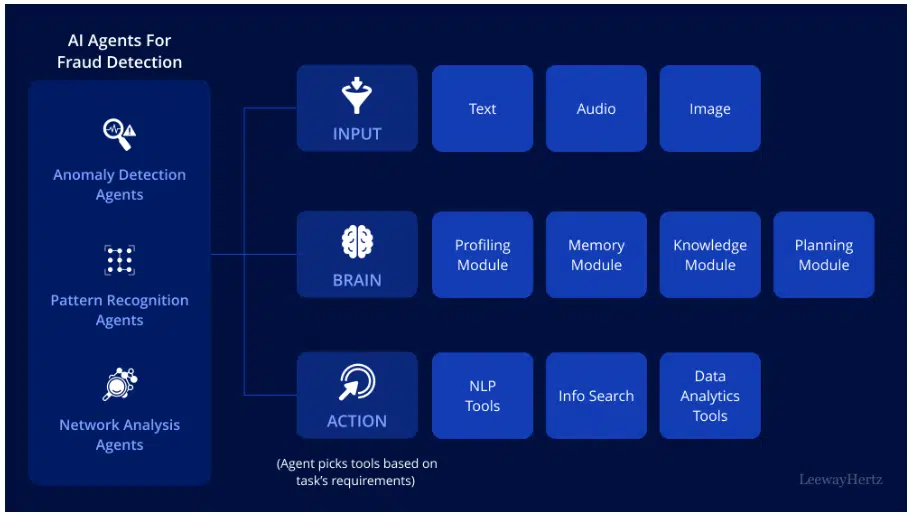
4. Fraud detection and risk management
Monitoring thousands of transactions manually is nearly impossible.
(Source)
AI can continuously analyze transaction data and:
- Detect unusual activity
- Identify potential fraud
- Generate real-time alerts
- Assess financial risks
This allows you to respond to issues before they become costly problems.
5. Financial reporting automation
Creating financial reports often involves gathering data from multiple systems.
AI can automate:
- Data collection and combining
- Report generation
- KPI tracking
- Performance analysis
As a result, finance teams can generate reports faster and spend more time analyzing insights instead of compiling spreadsheets.
AI Automation Use Cases in Human Resources
HR teams are responsible for managing everything from hiring and onboarding to employee support and retention. As organizations grow, many of these processes become increasingly time-consuming and difficult to manage manually.
AI automation helps you streamline HR workflows, reduce administrative tasks, and create a better experience for both employees and candidates.
Here are some of the most common AI automation use cases in human resources.
1. Resume screening and candidate shortlisting
Reviewing hundreds of resumes for a single position can take significant time.
AI can help by:
- Analyzing resumes at scale
- Matching candidates to job requirements
- Identifying relevant skills and experience
- Ranking applicants based on fit
This allows recruiters to focus on qualified candidates instead of manually reviewing every application.
2. Employee onboarding automation
The onboarding process often involves multiple forms, approvals, and training tasks.
AI-powered workflows can:
- Collect and verify employee documents
- Assign onboarding tasks automatically
- Schedule training sessions
- Answer common onboarding questions
This helps new hires get up to speed faster while reducing the workload for HR teams. Dedicated platforms take this further, using onboarding automation to trigger tasks, reminders, and approvals across a new hire’s first weeks, not just day one.
3. Employee helpdesk and HR chatbots
Employees frequently have questions about leave policies, benefits, payroll, and company procedures.
AI chatbots can provide instant answers by:
- Handling routine HR inquiries
- Assisting with leave requests
- Providing policy information
- Guiding employees to the right resources
This improves response times and allows HR teams to focus on more complex requests.
4. Performance management automation
Tracking employee performance manually can be difficult, especially in larger organizations.
AI can support performance management by:
- Collecting feedback from multiple sources
- Tracking goals and progress
- Identifying performance trends
- Generating performance summaries
This gives managers better visibility into employee development and performance.
5. Employee retention and workforce analytics
Employee turnover can be costly and disruptive.
AI can analyze workforce data to:
- Identify signs of employee disengagement
- Predict turnover risks
- Measure employee satisfaction
- Highlight workforce trends
These insights help HR teams take early steps to improve retention and workforce planning.
By automating routine HR processes, you can improve efficiency, reduce administrative work, and create a better experience for both employees and HR teams.
AI Automation Use Cases in Sales
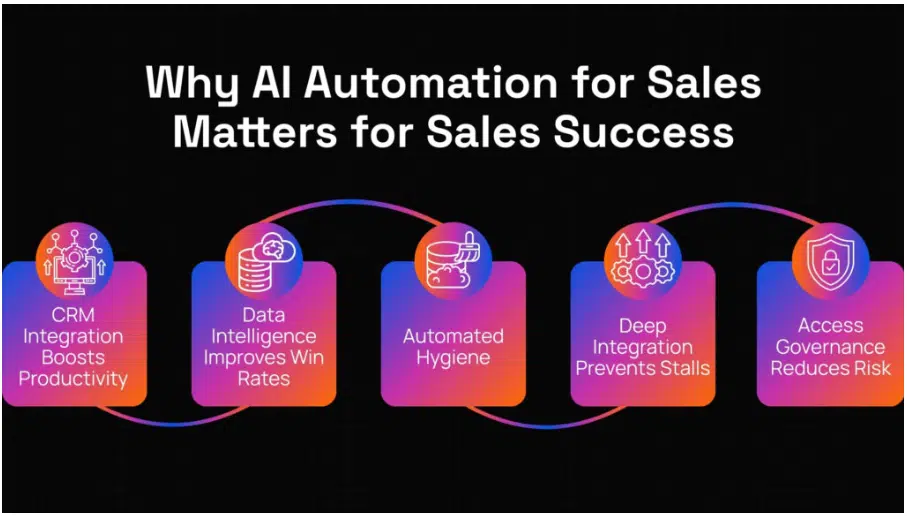
Sales teams spend a significant amount of time on tasks that don’t directly generate revenue. From researching prospects and updating CRM records to sending follow-ups and qualifying leads, many activities can be repetitive and time-consuming.
AI automation helps you streamline these processes so your sales team can spend more time building relationships and closing deals.
(Source)
Here are some of the most common AI automation use cases in sales.
1. Lead scoring and qualification
Not every lead is ready to buy. Identifying high-quality prospects manually can be challenging, especially when you’re dealing with a large pipeline.
AI can analyze customer data and buying signals to:
- Score leads based on conversion potential
- Identify high-intent prospects
- Prioritize sales opportunities
- Reduce time spent on unqualified leads
This helps your team focus on the leads that are most likely to convert.
2. Automated prospect research
Before reaching out, sales reps often spend time gathering information about prospects and their companies.
AI can automate this process by:
- Collecting company information
- Identifying decision-makers
- Tracking buying signals
- Updating contact data
This allows sales teams to personalize outreach without spending hours on manual research.
3. Personalized sales outreach
Creating personalized emails and follow-up messages at scale can be difficult.
AI can help by:
- Generating personalized email drafts
- Creating follow-up sequences
- Recommending messaging based on prospect data
- Optimizing outreach timing
As a result, sales teams can engage more prospects while maintaining a personalized approach.
4. CRM data entry automation
Many sales representatives spend valuable time updating CRM records after calls, meetings, and emails.
AI can automatically:
- Log customer interactions
- Update contact information
- Generate meeting summaries
- Record sales activities
This improves data accuracy while giving sales reps more time to focus on selling.
5. Sales forecasting and pipeline management
Accurate forecasting is critical for revenue planning and resource allocation.
AI can analyze historical and real-time sales data to:
- Predict future revenue
- Identify at-risk deals
- Track sales progress
- Highlight growth opportunities
These insights help sales leaders make better decisions and improve forecast accuracy.
By automating repetitive sales tasks, you can improve productivity, shorten sales cycles, and help your team focus on the activities that increase revenue growth. For businesses looking to further improve pipeline performance, Walls.io has compiled a guide covering proven lead generation techniques that can help attract and convert more qualified prospects.
6. Post Sales Customer Success Operations
The sales cycle doesn’t end when a deal closes. Customer onboarding, adoption, retention, and expansion activities are critical for long-term growth, but they often require significant manual effort.
AI can help customer-facing teams automate post-sales processes by:
- Monitoring customer health and engagement
- Identifying churn risks early
- Automating onboarding workflows
- Generating customer success insights
- Recommending expansion opportunities
These capabilities help teams deliver a more proactive customer experience while scaling customer success operations efficiently.
For example, AI can analyze product usage patterns, support interactions, and customer feedback to identify accounts that may need additional support or engagement. It can also help customer success teams prioritize outreach and personalize customer interactions based on real-time data. Check out this article for more ways to use AI for customer success automation.
AI Automation Use Cases in Marketing
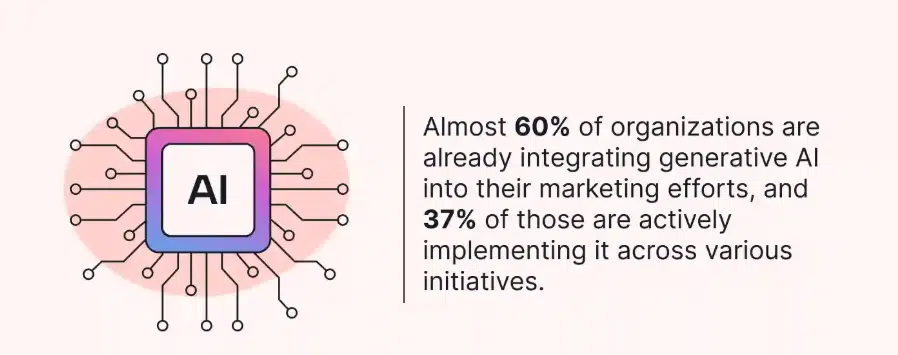
Marketing teams are expected to create more content, manage more channels, and deliver better results than ever before. However, many marketing activities still involve repetitive work that can slow down execution.
AI automation helps you streamline marketing workflows, improve campaign performance, and scale your efforts without significantly increasing your workload.
Here are some of the most common AI automation use cases in marketing.
1. Content creation and repurposing
Creating content consistently across multiple channels can be time-consuming.
AI can help by:
- Generating blog post drafts
- Creating social media captions
- Writing email copy
- Repurposing existing content into different formats
- Summarizing long-form content
This allows marketing teams to produce content faster while maintaining consistency across channels.
2. Email marketing automation
Email remains one of the most effective marketing channels, but managing campaigns manually can be challenging.
AI can automate tasks such as:
- Audience segmentation
- Personalized email creation
- Subject line generation
- Follow-up sequences
- Send-time optimization
This helps you deliver more relevant messages and improve engagement rates.
3. Customer segmentation and personalization
Different customers have different needs, interests, and behaviors.
AI can analyze customer data to:
- Group users into meaningful segments
- Identify behavioral patterns
- Deliver personalized content
- Recommend relevant products or services
As a result, your campaigns become more targeted and effective.
4. SEO and content optimization
Improving search visibility requires continuous content optimization and analysis.
AI can assist with:
- Keyword research
- Content gap analysis
- Search intent identification
- Content optimization recommendations
- Internal linking opportunities
This helps marketers create content that aligns better with what their audience is searching for.
5. Marketing analytics and reporting
Tracking performance across multiple campaigns and channels can quickly become difficult.
AI can automate:
- Campaign performance analysis
- KPI tracking
- Attribution reporting
- Trend identification
- Performance summaries
Instead of spending hours compiling reports, marketing teams can focus on using insights to improve future campaigns. Many teams pair this with a dedicated marketing analytics platform that ties campaign performance to real customer behavior, so they can see which efforts actually drive activation and revenue.
By automating repetitive marketing tasks, you can create more personalized experiences, improve campaign performance, and scale your marketing efforts more efficiently.
AI Automation Use Cases in Operations
Operations teams are responsible for keeping business processes running smoothly. From managing workflows and handling customer requests to processing documents and coordinating resources, operational tasks often involve a significant amount of repetitive work.
AI automation helps you streamline these processes, reduce delays, and improve efficiency across the organization.
Here are some of the most common AI automation use cases in operations.
1. Workflow automation
Many business processes require approvals, task assignments, and status updates that can slow down operations when handled manually.
AI can automate workflows by:
- Routing tasks to the right teams
- Starting approvals automatically
- Assigning work based on priority
- Sending reminders and notifications
- Monitoring process progress
This helps you eliminate delays and keep projects moving forward.
2. Customer support automation
Support teams often deal with large volumes of repetitive customer inquiries.
AI can help by:
- Answering common customer questions
- Routing tickets to the right agents
- Prioritizing urgent requests
- Generating suggested responses
- Providing 24/7 customer assistance
This improves response times while reducing the workload on support teams.
3. Supply chain and inventory management
Managing inventory and supply chain operations requires constant monitoring and forecasting.
AI can automate tasks such as:
- Demand forecasting
- Inventory tracking
- Stock level optimization
- Supplier performance monitoring
- Reorder recommendations
This helps businesses avoid stock shortages, reduce waste, and improve operational efficiency.
4. Document processing and data collection
Many operational workflows depend on documents such as contracts, forms, invoices, and reports.
AI can automatically:
- Extract information from documents
- Organize and categorize files
- Validate data entries
- Route documents for review
- Reduce manual data entry
This speeds up document-heavy processes while improving accuracy.
How to Successfully Implement AI Automation
Implementing AI automation is not just about adopting the latest technology. To see real results, you need to focus on the right processes, use the right tools, and have a clear plan for Implementation.
The most successful AI automation initiatives start small, deliver measurable results, and slowly expand across the organization.
Here are five steps to help you implement AI automation successfully.
1. Identify high-impact processes
One of the biggest mistakes businesses make is trying to automate everything at once. Instead, you should start by identifying processes that consume a significant amount of time and resources.
Look for workflows that are repetitive, manual, and performed frequently by your team. These tasks often cause delays and keep employees from focusing on more valuable work.
Some common examples include:
- Invoice processing
- Lead qualification
- Customer support ticket routing
- Employee onboarding
- Data entry and reporting
By focusing on high-impact processes first, you can generate quick wins and demonstrate the value of AI automation early in the implementation process.
2. Assess your data quality
AI automation is only as effective as the data it uses. If your data is inaccurate or spread across different systems, your AI workflows may produce unreliable results.
Before implementing AI automation, review the data that powers your business processes. Make sure it is organized, accessible, and regularly updated.
Ask yourself questions such as:
- Is the data accurate and up to date?
- Is information stored in multiple disconnected systems?
- Are there duplicate or incomplete records?
- Can teams easily access the data they need?
Taking time to improve data quality before Implementation can significantly improve the performance of your AI automation initiatives.
3. Choose the right AI automation tools
There is no shortage of AI automation platforms available today. However, choosing the right solution is about more than selecting the platform with the most features.
The best tool is one that fits naturally into your existing workflows and can grow alongside your business.
When evaluating AI automation tools, consider factors such as:
- Ease of implementation
- Integration with your existing software tools
- Security and compliance requirements
- Scalability as your business grows
- Available support and training resources
A solution that integrates well with your current systems can help reduce adoption challenges and speed up implementation.
4. Start with a small project
Rather than rolling out AI automation across the entire organization, begin with a smaller project that allows you to test the technology in a controlled environment.
A pilot project helps you understand what works, identify potential issues, and gather feedback from the people who will use the system daily.
For example, you might automate:
- Customer support ticket classification
- Resume screening
- Sales lead scoring
- Invoice processing
Starting small allows you to measure results before making larger investments. It also helps build confidence among stakeholders and team members who may be unfamiliar with AI-powered workflows.
5. Monitor, optimize, and scale
Implementing AI automation is not the final step. To maximize results, you need to continuously monitor performance and look for opportunities to improve your workflows.
Track key metrics such as productivity improvements, cost savings, processing speed, and error reduction. These insights will help you understand whether your automation initiatives are delivering the expected business value.
As you collect data and feedback, you can:
- Refine existing workflows
- Improve automation accuracy
- Expand automation to additional processes
- Identify new opportunities for efficiency increases
Once you’ve proven success in one area of the business, you can confidently scale AI automation across other departments and create a more connected, efficient organization.
Conclusion
AI automation is helping businesses reduce manual work, improve efficiency, and scale operations across finance, HR, sales, marketing, and operations.
The goal is to start with the right processes, implement automation gradually, and continuously optimize your workflows. Businesses that do this successfully will be better positioned to improve productivity and stay competitive as AI continues to develop.