

Most agencies have tried at least two time tracking tools. The first one got adopted for a week, filled with messy entries, and quietly abandoned. The second one was more full-featured, which meant more configuration, more fields, more friction, and the same outcome: half the team stops logging within a month.
The problem is rarely the concept. Agencies know they need to track time. Billable hours are how the business works. The problem is that most time tracking tools are built for either solo freelancers or enterprise operations teams, and agencies sit in an awkward middle ground where neither extreme fits.
This piece looks at five time tracking tools through the lens of what actually matters for agency teams: whether the tool gets used consistently after the initial rollout, where it creates friction in real daily workflows, and which kinds of teams each one fits best. If you are evaluating tools right now, the goal is to help you skip the ones that will fail at your agency and find the one that sticks.
The questions that actually matter
Most tool comparisons rank features. This one doesn’t, because the feature list is rarely why an agency’s time tracker fails. The questions worth asking are different:
- Will your team still be logging in three months? Adoption is the only metric that separates a useful tool from shelfware. Everything else – reports, invoicing, integrations – is worthless without consistent input.
- How many decisions does the tool ask for per entry? Every extra field, dropdown, or required tag is friction. Friction kills compliance.
- Does the tool match how your agency actually bills? A tool with strong invoicing is wasted on a team that bills through a separate system. A tool without invoicing is frustrating for a team that wants tracked hours to flow directly into client bills.
- What happens when your team size changes? Agencies add and drop contractors regularly. Pricing that punishes scaling is a hidden cost.
Why agency time tracking fails so often
Agency work is not factory work. People switch between clients constantly. A designer might touch four projects in a morning. An account manager runs between calls, internal syncs, and admin tasks that don’t bill anywhere. The workflow is fragmented, and the typical time tracker asks for too many decisions per entry:
- Which client?
- Which project under that client?
- Which task or phase?
- Billable or non-billable?
- Which billing code?
Multiply that by 15 context switches per day and you can see why the tool gets abandoned. The cost of logging exceeds the perceived benefit.
The second failure mode is reporting. Agency owners need to see utilisation rates, billable versus non-billable splits, and per-client profitability. But if the tool makes reporting hard to pull or hard to trust because entries are incomplete, the data is useless and the tool gets blamed for a problem it can’t solve without consistent input.
This is why the right tool for an agency is not the one with the most features. It is the one with the least friction between “I should log this” and “it’s logged.” Everything else is secondary. For agencies already thinking about how to measure and report on campaign performance, the principle is the same: the best measurement system is the one that actually gets used.
What to look for in a time tracking tool for agency work
Before comparing specific tools, it helps to know which features actually matter for agencies and which ones sound good in a feature table but create friction in practice.
Fast entry above everything. The core action, logging time against a client or project, should take under five seconds. If it takes longer, people skip it. Timers should start in one click. Manual entries should require a project, a duration, and nothing else unless the user wants to add more.
Client and project organisation that maps to how agencies work. Agencies think in clients first, projects second. A tool that forces you into a deep hierarchy of workspaces, folders, and task types before you can log time is built for a different kind of business.
Reporting that answers the questions agencies actually ask. How many billable hours did we log this week? What is our utilisation rate? How much time went to Client X this month? These are the reports that matter. Dashboards with 40 widgets and no clear answer to these questions are a distraction. The same principle applies to any data-driven agency function: if the report doesn’t answer the question you walked in with, the tool is failing you.
Invoicing or clean export. Time entries need to flow into invoices or billing systems without a manual reconciliation step. Either the tool handles invoicing itself or it exports cleanly enough that your finance person can work with the data without reformatting it.
Flat pricing. Agencies add and remove contractors, interns, and part-time staff regularly. Per-user pricing with tiers and add-ons creates budgeting headaches. The simpler the pricing model, the easier it is to scale the team up or down without renegotiating your tooling cost.
Timen: minimal tracking that stays out of the way
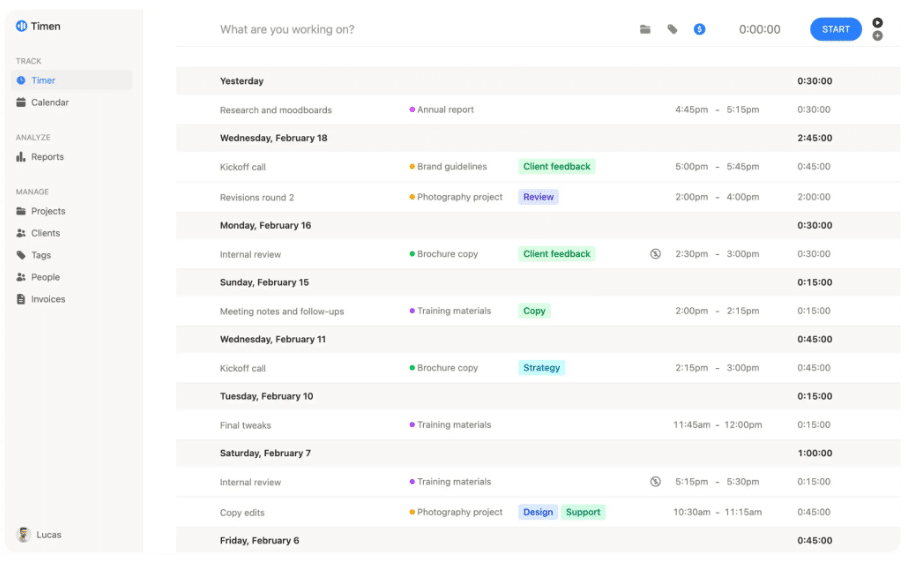
What it is good at. Timen is built around one idea: time tracking should be fast enough that people actually do it. The interface is minimal. You pick a project, start a timer or add a manual entry, and move on. What you get out of the box:
- One-click timer or manual time entry
- Calendar view for reviewing the week at a glance
- Reports filtered by client, project, or date range
- Built-in invoicing that converts tracked hours directly into bills
- CSV and PDF exports for anything finance needs externally
The pricing model is flat: $9 per user per month, all features included. No tiers, no add-ons, no enterprise upsell. For agencies that scale their team up and down with project load, this makes budgeting predictable.
Where agency teams hit friction. Timen’s simplicity is also its ceiling. There are no task boards, no Gantt charts, no resource allocation views, and no way to track project budgets against logged hours inside the tool. If your agency needs to see “we’ve burned 60% of the budget with 40% of the deliverables done,” Timen won’t show you that. You’ll need a separate PM tool for scope management and use Timen only for the time logging layer.
Integrations are lighter than Toggl or Harvest. There’s no native connection to QuickBooks, Xero, Asana, or Slack. If your workflow depends on time data flowing automatically into accounting or project management tools, you’ll be exporting CSVs and importing them manually. For agencies with a tightly wired tool stack, that’s a real limitation.
The reporting, while clean, is also basic compared to Harvest. You get time by client, by project, and by person. You don’t get utilisation dashboards, forecasting, or the kind of multi-dimensional breakdowns that larger agencies build their capacity planning around.
Who should use it. Small to mid-size agencies (under 30 people) that bill by the hour and want a tool their team will actually use daily. Teams that value adoption over configurability and are willing to trade depth of reporting for consistency of input.
Who should avoid it. Agencies with complex billing structures that need approval workflows, tiered rates by seniority, or multi-currency invoicing. Teams that need their time tracker tightly integrated with accounting software. Agencies over 30 people who require capacity planning and resource forecasting from their time data.
Toggl Track: familiar but limited for agency billing
What it is good at. Toggl is probably the most widely recognised time tracker. The interface is clean, the timer starts fast, and onboarding is simple. For a freelancer or a very small team that just needs to know where hours went, it works well. The free tier covers basic tracking for up to five users.
Where agency teams hit friction. The gap shows up when you try to connect tracked time to actual billing. Toggl’s invoicing is limited compared to tools that were built with billing in mind. Reporting is fine for personal productivity but doesn’t always surface the breakdowns agency finance teams need:
- Per-client hours and profitability by month
- Billable versus non-billable splits across the team
- Budget burn rate per project
- Utilisation rates by role or department
You can get some of this through exports and manual work, but at that point you’re building reports outside the tool, which defeats the purpose.
The bigger issue for agencies is that Toggl’s ecosystem encourages you to add Toggl Plan for project management, which introduces another layer of tooling and another subscription. Teams that want time tracking to stay simple end up managing two products instead of one.
Who should use it. Solo consultants or very small teams (under five people) who bill simply and don’t need integrated invoicing. Agencies with more complex client structures usually find they need more than Toggl offers without bolting on additional tools.
Who should avoid it. Agencies with 10 or more people who need clean per-client billing reports and integrated invoicing. The workarounds to get this from Toggl usually cost more time than they save.
Harvest: strong on invoicing, heavier on setup
What it is good at. Harvest has been around since 2006 and is a mature tool with strong invoicing, expense tracking, and a solid integration ecosystem. The time-to-invoice workflow is genuinely good: tracked hours flow into invoices with minimal friction, and the Stripe integration handles payment collection. For agencies that want one tool covering time tracking, invoicing, and basic project budgeting, Harvest covers the most ground.
Where agency teams hit friction. Harvest carries more setup weight than lighter tools. Before the system works as intended, you need to configure:
- Project budgets and billing methods (hourly, fixed, non-billable)
- Billing rates per person or per role
- Expense categories and approval rules
- Client records with payment terms
- Permissions for who sees what in reports
For a 5-person agency, this setup takes an afternoon. For a 30-person agency with 40 active clients, it takes significantly longer and requires ongoing maintenance as people and projects change.
The interface feels older than newer competitors. It is functional but not fast in the way that tools built in the last few years feel fast. Team members who are used to modern, minimal interfaces sometimes find Harvest’s density off-putting, which quietly affects adoption.
Who should use it. Established agencies with 15 or more people who need integrated invoicing, expense tracking, and project budgeting in one system, and who are willing to invest in setup to get those benefits. Agencies already using tools in Harvest’s integration ecosystem (Asana, Slack, QuickBooks).
Who should avoid it. Small, fast-moving teams that want to start tracking immediately without configuring billing rates, budgets, and project structures first. Agencies where the priority is getting the team to log time consistently rather than building a comprehensive financial reporting system.
Clockify: free until it isn’t simple
What it is good at. Clockify’s core pitch is generous free-tier time tracking for unlimited users. For teams that genuinely just need a shared timer and basic reports, the free plan works. The interface is clean enough, and the browser extension makes starting timers convenient.
Where agency teams hit friction. The free tier is the hook, but the features agencies actually need – invoicing, project budgets, approval workflows, custom reports – sit behind paid plans that quickly approach the cost of tools that include those features from the start. By the time you have added the features your agency needs, you are paying a similar price to Harvest or Toggl’s paid tiers but using a tool that was designed around its free plan.
The other friction point is feature sprawl. Clockify has added scheduling, PTO tracking, expense tracking, and project management features over time. The result is a tool that tries to cover:
- Time tracking
- Project management
- Scheduling and shift planning
- PTO and leave management
- Expense tracking
- Invoicing
None of those get the focus or polish of tools that specialise in one thing. For agencies, this often means more menus, more settings, and more places where team members get confused about where to log what.
Who should use it. Very budget-constrained teams that need basic shared time tracking and can live with the free tier’s limitations. Teams testing whether time tracking will work at their agency before committing to a paid tool.
Who should avoid it. Agencies that know they need invoicing, client reporting, or project budgeting. The upgrade path is not as clean as starting with a tool that includes those features by design.
What to choose by agency type
Freelancer or solo consultant. Toggl Track’s free plan is enough. You don’t need client organisation or team reporting. Just a timer and basic exports.
Small agency, under 15 people, billing by the hour. Timen is the strongest fit here. Fast logging, clean reports, built-in invoicing, flat pricing. The trade-off is limited integrations and basic reporting, but for most small agencies the simplicity is exactly why it gets adopted.
Mid-size agency, 15 to 50 people, with complex billing. Harvest earns the setup cost at this scale. Integrated invoicing, expense tracking, project budgets, and a mature integration ecosystem justify the heavier configuration.
Agency testing time tracking for the first time. Start with Clockify’s free tier to prove the concept. If the team adopts the habit, migrate to a tool with better invoicing and reporting. If they don’t, the problem is process, not software.
A note on monitoring tools like Hubstaff. Hubstaff and similar tools offer screenshot capture, activity scoring, and app monitoring. They solve a real problem for businesses managing large remote contractor teams where task verification matters. But for most agency environments, research suggests that monitoring knowledge workers reduces engagement and increases turnover. If your team is made up of professionals you trust to manage their own time, a monitoring tool is solving the wrong problem.
The pattern across all of these is the same: the right tool is the one your team will still be using in three months. A tool with 200 features and 20% compliance is worth less than a tool with 10 features and 90% compliance. If people log time without being chased, the tool is working. If you spend more energy enforcing the tool than using the data it produces, switch.
Final thoughts
Every agency that has cycled through multiple time trackers already knows the answer to this question. The tool that works is the one your team actually uses. Not the one with the longest feature list, not the one your accountant recommended, and not the free one that nobody opens after week two.
For small agencies billing by the hour, that usually means picking the simplest option that still covers reporting and invoicing. For larger operations with layered billing, the extra configuration of a heavier tool pays off. But regardless of size, the test is the same: check your logs at the end of next month. If more than 80% of the team is logging consistently, keep the tool. If not, the problem is friction, and friction means you picked the wrong one.
Time tracking is one piece of a broader shift toward data-driven agency operations. The same principle applies to campaign measurement, media monitoring, and client reporting: the system that produces trustworthy data is the one that’s easy enough to feed consistently.