

Capturing the perfect shot is often a matter of timing, but unwanted distractions like photobombers or messy backgrounds can easily ruin the frame. Fortunately, modern AI technology has made it incredibly simple to polish your images without needing professional editing skills. This guide explores the most effective tools available today to help you achieve a clean, distraction-free aesthetic in seconds.
1. BeautyPlus
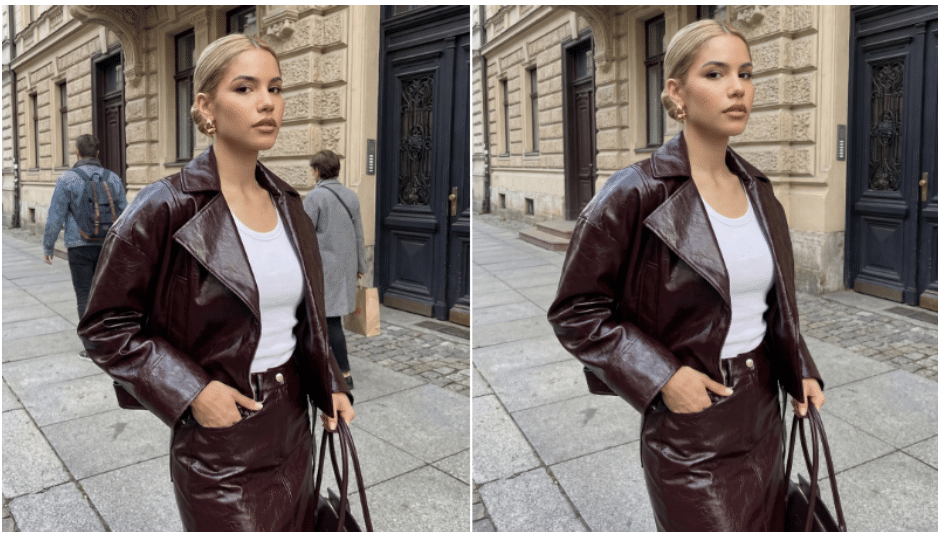
BeautyPlus has established itself as a premier choice for creators who want a balance between sophisticated AI automation and creative control. It excels at identifying complex elements within a photo and neutralizing them so naturally that the background remains intact. Whether you are dealing with a crowded tourist spot or a stray power line, this tool provides a seamless way to remove object from photo while maintaining high-resolution quality. Many users also rely on its precision to remove text from image online when logos or captions clutter a beautiful composition.
Key Features
- Smart AI-driven content-aware fill for natural background reconstruction.
- Specialized detection modes for different categories like people, skin blemishes, or text.
- Multi-platform accessibility for editing on the go or via a desktop browser.
Pros
- Offers both manual and auto modes to give users full control over the editing process.
- Auto-recognition effectively identifies and eliminates people, text, watermarks, and even wrinkles.
- Flexible payment models with one free trial per day to test premium features.
- Strong data privacy protocols ensuring your uploaded images remain secure and protected.
Best For
This tool is ideal for social media enthusiasts and portrait photographers who need quick yet professional-grade retouching. It is particularly effective for those who want to clean up selfies or travel photos with minimal effort.
2. Photoroom
Photoroom is widely recognized for its efficiency in the e-commerce world, where clean product shots are a necessity. Its object removal tool is designed to be lightning-fast, allowing users to “brush” over distractions and watch them vanish instantly. The interface is stripped of unnecessary complexity, focusing entirely on speed and high-quality output.
Key Features
- High-speed batch processing capabilities for multiple images.
- Integrated background replacement tools that work alongside the object remover.
- Mobile-first design optimized for quick touch-screen interactions.
Pros
- Extremely intuitive “magic brush” that requires no prior editing experience.
- Great for removing messy backgrounds and clutter in a single workflow.
- Maintains the lighting and texture of the original photo after the object is gone.
Best For
This platform is a top choice for small business owners and online sellers who need to prep product catalogs. It works wonders for anyone looking to create professional marketing imagery on a tight schedule.
3. Cleanup.pictures
If you are looking for a dedicated, no-frills utility, Cleanup.pictures is a standout web-based solution. It utilizes an advanced generative AI model that focuses exclusively on the task of inpainting. The beauty of this tool lies in its simplicity; you simply upload a photo, highlight the unwanted area, and the AI does the heavy lifting.
Key Features
- Open-source AI technology that provides high-quality masks and fills.
- Clean, ad-free web interface that loads quickly on any device.
- Real-time preview of changes as you apply the brush.
Pros
- Completely free to use for standard-definition downloads.
- Does not require an account or login for quick, one-off edits.
- Handles complex textures like grass or wood grain surprisingly well.
Best For
This is the perfect tool for casual users who need a quick fix for a single photo without downloading software. It is excellent for removing small distractions like trash on the ground or sensor dust.
4. Picsart
Picsart is a comprehensive creative suite that includes a powerful AI-driven “Remove” tool. Unlike standalone apps, Picsart allows you to integrate object removal into a larger design process involving filters, stickers, and text overlays. The AI is trained to understand the context of the image, ensuring that the space left behind by a removed object is filled logically.
Key Features
- Advanced brush customization including size and hardness settings.
- Cloud-based syncing so you can start an edit on your phone and finish on your PC.
- AI-powered “Remove” button that suggests areas to clean up.
Pros
- Part of an all-in-one ecosystem with massive creative assets.
- High precision for removing intricate items like wires or fence segments.
- Regular updates that constantly improve the AI’s realistic filling capabilities.
Best For
Creative designers and digital artists will find this tool most useful as part of their broader workflow. It is best for those who want to do more than just “fix” a photo, but rather transform it into a piece of art.
5. NoteGPT
NoteGPT has branched out from its AI productivity roots to offer a streamlined AI object remover. It leverages a modern neural network to analyze pixels and predict what should be behind an unwanted object. The tool is designed for clarity and ease of use, making it accessible for people who might not be tech-savvy.
Key Features
- Minimalist web interface focused on user experience.
- Fast processing speeds even for larger file sizes.
- Support for various image formats including JPG and PNG.
Pros
- Simple “upload and erase” workflow that takes only seconds.
- Generally produces clean edges without the “blur” effect common in older tools.
- Accessibility from any browser without needing heavy system resources.
Best For
This tool is great for students and professionals who are already using AI productivity tools and want a reliable, quick-access editor. It is best suited for straightforward removals where speed is the priority.
6. Magic Studio
Magic Studio offers a suite of AI tools, with “Magic Eraser” being its flagship feature for object removal. It is designed to be “magical” in the sense that it requires almost zero user input beyond highlighting the target. The platform is built with a focus on high-resolution results that are ready for professional use.
Key Features
- Specialized algorithms for removing people from landscape shots.
- API availability for developers who want to integrate the tool into other apps.
- High-resolution export options for premium users.
Pros
- Very effective at reconstructing architectural lines and repetitive patterns.
- Offers a very forgiving brush that doesn’t require “pixel-perfect” highlighting.
- Fast rendering times that beat many traditional desktop software options.
Best For
Real estate photographers and travel bloggers will find Magic Studio particularly helpful. It is the go-to for cleaning up shots of buildings or wide-angle landscapes where detail is everything.
7. Adobe Firefly
Adobe Firefly represents the cutting edge of generative AI, integrated into the Adobe ecosystem. Its “Generative Fill” feature goes beyond simple removal; it actually recreates parts of the scene based on text prompts or surrounding context. It is perhaps the most powerful tool on this list, offering a glimpse into the future of photographic editing.
Key Features
- Generative AI that can add, replace, or remove elements.
- Deep integration with Photoshop for professional layer-based editing.
- Enterprise-grade security and ethical AI training models.
Pros
- Unmatched ability to handle extremely large or complex object removals.
- Allows users to describe what should replace the removed object.
- Produces results that are often indistinguishable from the original scene.
Best For
Professional photographers and graphic designers who require absolute perfection and have an Adobe subscription. It is best for high-stakes projects like commercial advertising or editorial photography.
Conclusion
Choosing the right object remover depends on your specific needs, whether it is the professional power of Adobe or the mobile convenience of BeautyPlus. Each of these tools offers a unique way to reclaim your photos from unwanted distractions and photobombers. By utilizing these AI-powered solutions, you can ensure your visual storytelling remains focused on what truly matters.